Kapi Cam Live Photo on Android: Save, View and Share the Original
Kapi Cam has an official Android version, but a moving photo can look different in Kapi, your gallery, and TikTok. The safest workflow is to keep the original first, then check each app separately.
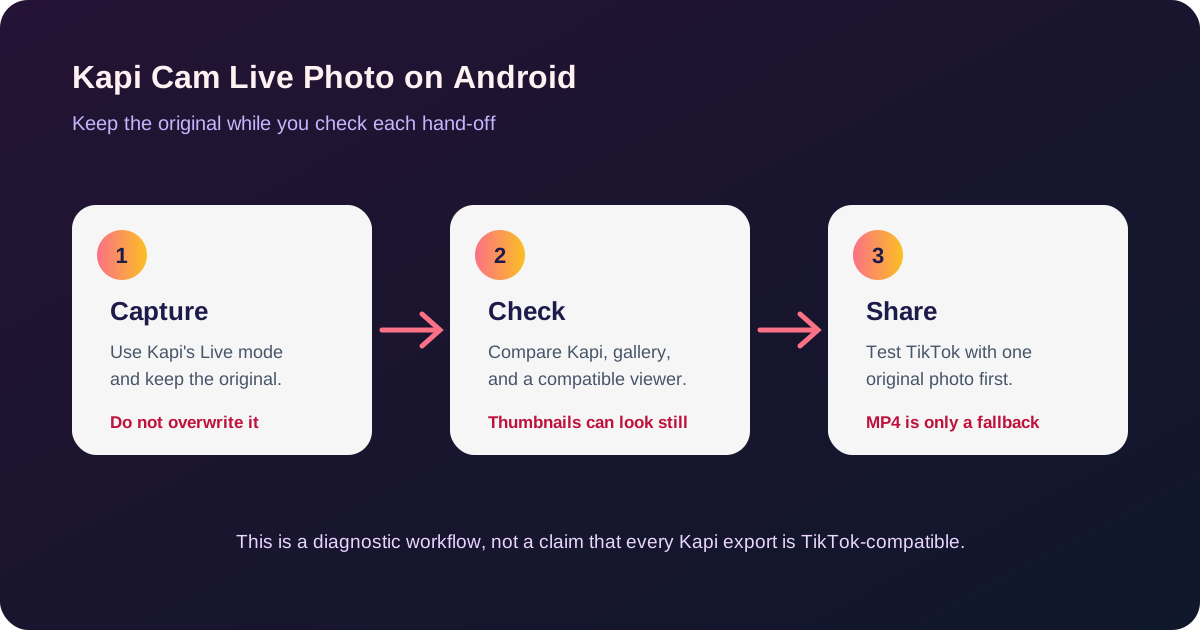
The official Google Play listing identifies Kapi Cam—Y2K & CCD Camera as an Android app from Sensevideo. Its recent update notes mention fixes for Live Photo covers and imported Live Photos that could not be viewed or saved. Those notes show that file-handling problems exist; they do not guarantee that every Kapi file will be recognized as a native Live Photo by TikTok.
Keep the original before troubleshooting
Capture one test image with visible movement and save it using Kapi's current Live Photo control. Do not edit it, send it through a messenger, or overwrite it with a still export. Give the file a clear name such as kapi-test-original and keep a backup.
The exact control name and placement may vary by Kapi version and phone. Use the control shown by your installed app rather than following a screenshot from another device. If the app offers separate still, video, or Live Photo save choices, choose the Live Photo option for this test and record which option you used.
Check the same file in three places
1. Kapi preview
Open the captured image inside Kapi and confirm that the movement plays there. This confirms that the capture session produced motion that Kapi can read.
2. Your gallery
Open the saved original in the gallery that normally handles your phone's camera files. A still thumbnail is not enough to diagnose a problem. Look for the gallery's own motion or play action, and compare it with the Kapi preview.
If Kapi plays the image but the gallery does not, the viewer may not understand Kapi's output or may be showing only the cover image. Do not immediately convert or delete the original.
3. TikTok
If your goal is a native moving photo, test the original inside TikTok's Photo upload flow with one image. Do not add filters, templates, or multiple images during the first test. Then separately test the Live Photo comment flow if that is where you want to use it.
TikTok has announced Live Photo Comments globally, but its announcement does not provide an Android compatibility table for Kapi or other vendor formats. See the official announcement and the more detailed TikTok Android troubleshooting guide.
What “the photo is still” can mean
| What you see | Most useful interpretation | What to do next |
|---|---|---|
| Kapi plays it, gallery is still | Viewer difference is possible | Reopen in Kapi and keep the original |
| Kapi and gallery play it, TikTok shows a still | TikTok did not recognize this source in that posting surface | Try one fresh original and compare Photo post with comment |
| TikTok moves, gallery is still | The gallery is not a reliable test for this file | Preserve the original and verify the published TikTok result |
| Nothing plays | The motion may not have been saved or the file may have been re-saved | Find the original backup or take a new test shot |
| The file only exists as a JPG still | The motion data may already be gone | A converter cannot recreate the captured movement |
One 2026 Google Play review described a Kapi image that appeared still in the gallery but moved in TikTok. It did not identify the phone, app versions, or whether the result was a photo post, comment, or video. Treat it as a useful reason to check more than one viewer, not as a universal compatibility promise.
If you need to inspect the file
For a Samsung or Pixel Motion Photo saved as an original JPG, use Motion Photo Viewer to see whether this site can read a playable clip. This is a file check, not a Kapi or TikTok compatibility badge. The current viewer targets original JPG/JPEG Motion Photos. If it cannot read a Kapi file, that only means this checker doesn't support the format. It does not mean the motion is missing.
Keep a copy of the Kapi original even after a successful export. The exported still or video may not contain the same metadata and may not be reusable as a native motion photo.
Use video only when you want a video post
If your goal changes from a native Live Photo to “make the movement play in the feed,” export a normal video from Kapi if its current version provides that action. If you have an original Samsung or Pixel Motion Photo JPG, Motion Photo to Video can extract its embedded clip locally.
That MP4 is a different deliverable: it is suitable for TikTok's video flow, but it does not prove that the original Kapi file is a TikTok-native Live Photo. Do not replace the original with the MP4.
Before reporting a Kapi or TikTok problem
Record the Kapi version, phone model, Android version, TikTok version, region, file type, and where the image moves or stays still. Keep the untouched original and note whether you used TikTok's Photo post, Live Photo comment, or video flow. This information is much more useful than a screenshot of a static thumbnail.
The reliable rule is simple: Kapi, a gallery, and TikTok are three separate readers. Test the same original through each one before changing the file.