


Pet Halloween Photoshoot Ideas: Easy At-Home Shots for Dogs and Cats
The pumpkin costume fits, the dog looks adorable, and every photo is a blur of ears because he will not stop shaking his head. The cat wore the witch hat for exactly one second, and you missed it. The office pet photo contest closes on Friday.
Pet Halloween photos are hard for one reason: the good moment lasts less than a second. The ideas below are built around that, and none of them need a studio, a photographer or anything you can't find at home.
Quick answer
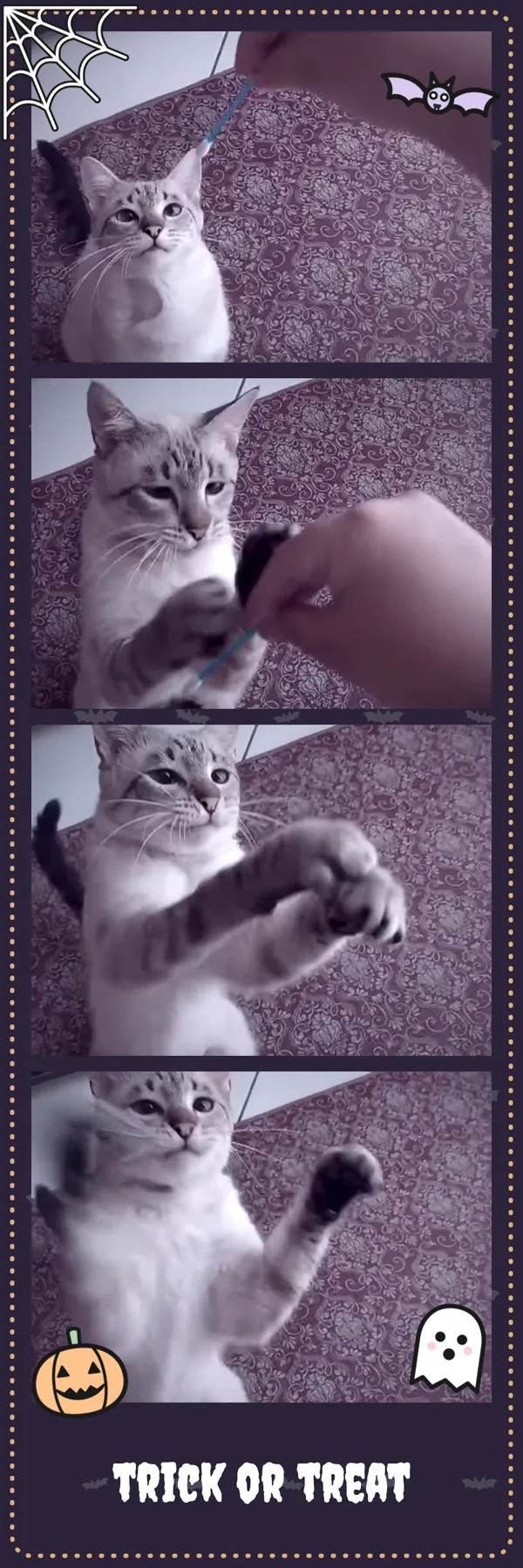
Shoot in Live Photo mode on iPhone or Motion Photo on Android, so every shot keeps a few seconds of movement around it. Afterwards, pull out the one frame where the ears are up and the eyes are open, put four of them in a Halloween photo strip, and add a pun as the caption.
Shoot moving pictures, then pick the frame
A normal photo gives you one chance. A Live Photo or Motion Photo saves about 1.5 seconds before and after you press the shutter, so the moment the hat is still on is in there somewhere, even if the "photo" itself caught a sneeze.
- iPhone: turn on Live Photo (the circles icon at the top of the Camera app).
- Samsung and Pixel: turn on Motion Photo in the camera settings. Other Android phones can do the same with an app like LivePhoto Camera.
Later, pick the moment:
- iPhone: open the Live Photo in the frame extractor, scrub to the best moment and save that frame as a photo.
- Samsung and Pixel: open the original Motion Photo in the Motion Photo viewer, drag to the frame you want and save it as a JPG.
A frame from the moving part is a little smaller than the main photo, which is plenty for a phone screen, a story or a photo strip. Both tools run in your browser, so the photos stay on your phone.
10 easy pet Halloween photo ideas
- The pumpkin patch at home: three or four small pumpkins on the floor, your pet in the middle, camera at their eye level.
- Treat on the nose: the classic patience shot. Take it as a Live Photo and you also get the moment the treat flies.
- Ghost bandana: a white bandana with two felt eyes. Safer and calmer than a sheet over the head.
- Witch-hat sequence: hat on, hat tilting, hat falling, pet looking proud. Four frames, one story.
- Trick-or-treat bucket: a small pet peeking out of a candy bucket (no real chocolate inside).
- Black-cat silhouette: cat on the windowsill against the evening sky, phone exposure turned down.
- Matching costumes: you and your pet as a pair, like a pumpkin and its farmer.
- Spooky lighting: turn the room lights off and light your pet's face from below with your phone torch, gently and from a distance.
- Costume reveal: first frame in the bag, last frame in full costume.
- The outtakes: the sneeze, the yawn, the zoomies. Often the funniest strip of the night.
Make a Halloween photo strip from the best four
A strip turns four good frames into one picture that is easy to post and easy to enter in a contest. Open the Halloween photo booth, choose Choose from gallery, add your four frames, and download.
The Halloween style comes with bats, a cobweb, a pumpkin and a little ghost, plus a Spooky filter that you can switch off if you want your pet's real colours. Everything is processed in your browser, and there is no watermark.
Want the zoomies instead of a still? Turn the moving shot into a looping GIF with Live Photo to GIF and send it to the group chat.
Free tool · in your browserLive Photo → GIFCreate animated GIFOpen →Pet Halloween caption ideas
- Trick or treat? I'll take the treat.
- Boo-tiful.
- Howl-o-ween.
- Purr-anormal activity.
- I only came for the candy.
- Spooky, but make it fluffy.
- This costume was not my idea.
- Ghoul's best friend.
Keep it fun for your pet
Short sessions work best: five minutes, lots of treats, and the costume off as soon as your pet seems unhappy. Skip anything that covers the eyes or ears, never leave a costume on when you're not watching, and keep chocolate and candy wrappers out of reach.
FAQ
What is the easiest way to get a sharp photo of a moving pet?
Shoot in Live Photo or Motion Photo mode, then pick the sharpest moment later. You get many chances from one press of the shutter.
How do I make a photo strip for a pet photo contest?
Choose four frames, open the Halloween photo booth, add them from your gallery and download the strip as PNG or JPG. Check the contest rules first, since some only accept a single photo.
Can I do all of this on Android?
Yes. Open Samsung or Pixel Motion Photos in the Motion Photo viewer to save the frame you want, and the photo booth runs in any mobile browser.
Are my pet photos uploaded anywhere?
No. The frame tools and the photo booth all process your photos inside your browser.